 Backtrack
How to back up all your Claude chats
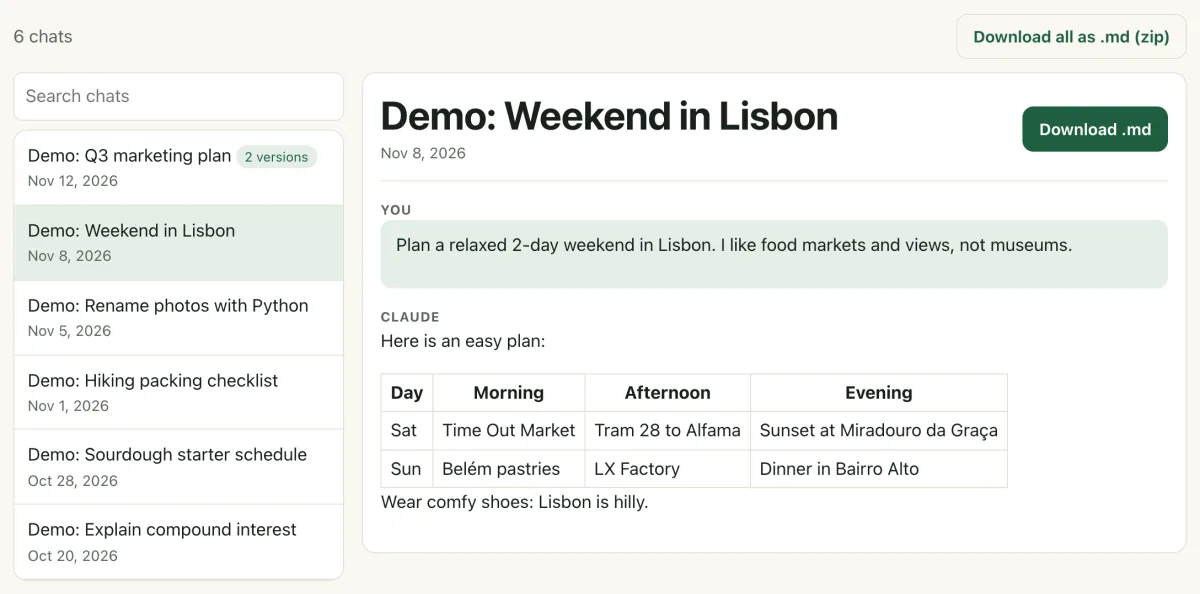
Short answer: Claude has a free built-in backup: on claude.ai go to Settings → Privacy → Export data, and Claude emails you a zip with all your chats. That zip is JSON, so open it in the free Claude Export Viewer and click Download all as .md (zip) to get one readable file per chat.
If you'd rather click one button inside claude.ai, Backtrack does the whole thing for you (first full backup free).
Why back up your Claude chats at all?
Your chats live on Anthropic's servers, tied to your account. A copy on your own computer means you can search old answers offline, keep them if you close or lose the account, and hold on to the versions of a chat that claude.ai tucks away after you edit a message.
The free way, step by step
- Request Claude's data export. On claude.ai or the Claude desktop app, open Settings → Privacy and click Export data. (It can't be started from the iPhone or Android app. On Team and Enterprise plans, an owner has to allow it.)
- Download the zip. The link arrives by email, expires 24 hours after it's created, and may only work once. Download it straight away.
- Turn it into readable files. Open the viewer, drop in the zip, and click Download all as .md (zip). You get one .md file per chat that opens in any text editor. (Details in how to read your Claude data export.)
- Store both files safely. Keep the original zip (it has everything, including every version of edited chats) and the .md zip together in a cloud drive or on an external disk.
- Repeat. An export only covers chats up to the day you made it. Set a monthly reminder.
Your options compared
| Claude's export | Export + free viewer | Backtrack | |
|---|---|---|---|
| Cost | Free | Free | First full backup free; Pro $4.99 once |
| Effort | Request, wait for email, download | Same, plus one click | One click inside claude.ai |
| Readable files | No, JSON | Yes, .md | Yes, .md |
| Sorted by project | No | No | Yes |
| Every version of edited chats | Yes (in the JSON) | Newest version only | Yes |
| Files Claude made | Inside the JSON | Inside each .md | Saved as separate files |
| Automatic | No | No | Pro: daily |
The faster way: one click with Backtrack
Backtrack is a Chrome extension that adds a green Backtrack button next to Claude's Share button. Open its Backup tab and click Back up all my Claude chats.
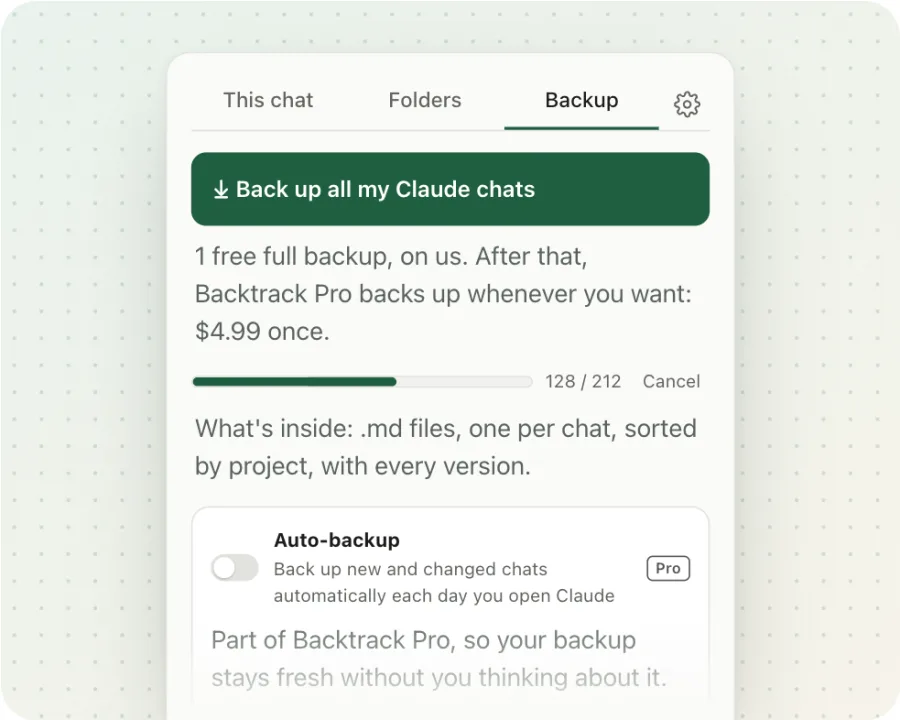
It reads your chats from claude.ai the same way the page does and builds one zip in your browser. Inside, there's a folder per project, one .md file per chat with every version, and the files Claude made saved next to each chat. The zip lands in a Backtrack folder in your Downloads. If you stop it halfway, press the button again and it carries on where it stopped.
- Free: one full backup, plus saving any single chat as .md whenever you like.
- Pro, $4.99 once: back up any time, and turn on Auto-backup to save new and changed chats each day you open Claude.
Back up every Claude chat in one click. No account, and nothing leaves your browser.
Add to Chrome, freeFAQ
How often should I back up my Claude chats?
Whenever losing the last few weeks would hurt. For most people that's once a month, or before deleting chats or closing an account. Backtrack Pro can back up automatically each day you open Claude.
Can I import a backup back into Claude?
No. Anthropic says exported data can't be imported into another personal Claude account. A backup is for keeping and reading your chats, not for restoring them into Claude.
Does the backup keep my projects?
Claude's export has one file per project, but it doesn't say which chats belong to which project. A Backtrack backup sorts chats into a folder per project, with chats outside a project in a "No project" folder.
Where does a Backtrack backup go?
To a Backtrack folder inside your Downloads, as one zip named with the date. It's made in your browser and never uploaded.
Is Backtrack Pro a subscription?
No. Pro is one $4.99 payment with no account. Your first full backup is free without Pro.
Related guides
Backtrack is an independent tool. It is not affiliated with, endorsed by, or sponsored by Anthropic. Claude is a trademark of Anthropic. Facts about claude.ai are from Anthropic's help center as of November 2026.