 Backtrack
How to open and read your Claude data export
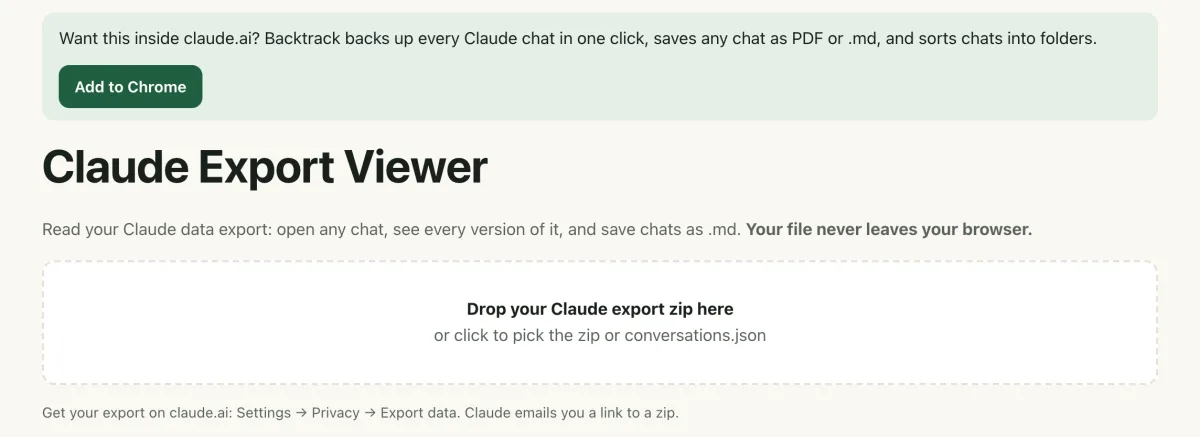
Short answer: Claude's data export is a zip of JSON files made for computers, not people. The easiest way to read it is to drop the zip into the free Claude Export Viewer: it opens every chat in your browser, lets you search them, and saves any chat as a .md file. Nothing is uploaded.
To get the export in the first place, go to Settings → Privacy → Export data on claude.ai. Claude emails you a download link.
What's inside the export
The zip holds a few JSON files. The one that matters is conversations.json: every chat you have, with every message. A few details make it hard to read by hand:
- It's one giant file. Open it in a text editor and you'll see thousands of lines of brackets and IDs.
- Edited chats are trees, not lists. Each message points to the one before it with a
parent_message_uuid. When you edit a message, two messages share the same parent, so the old and new versions are mixed together. - Projects are separate. There's a
projectsfolder with one file per project, but it doesn't say which chats belong to which project.
According to Anthropic's help center, the export includes your conversations and account data, but not the original files you uploaded.
Step by step
- Request the export. On claude.ai (or the Claude desktop app), open Settings → Privacy and click Export data. You can't start an export from the iPhone or Android app. On a Team or Enterprise plan, an owner has to allow members to export their own data first.
- Download the zip. Claude emails a link to the address on your account. The link expires 24 hours after it's created and may only work once, and you need to be signed in, so download it right away. If it expires, just request a new one.
- Open the free viewer. Go to backtrackchats.com/viewer and drop the zip onto the page, or click to pick it. You don't need to unzip it first. A loose
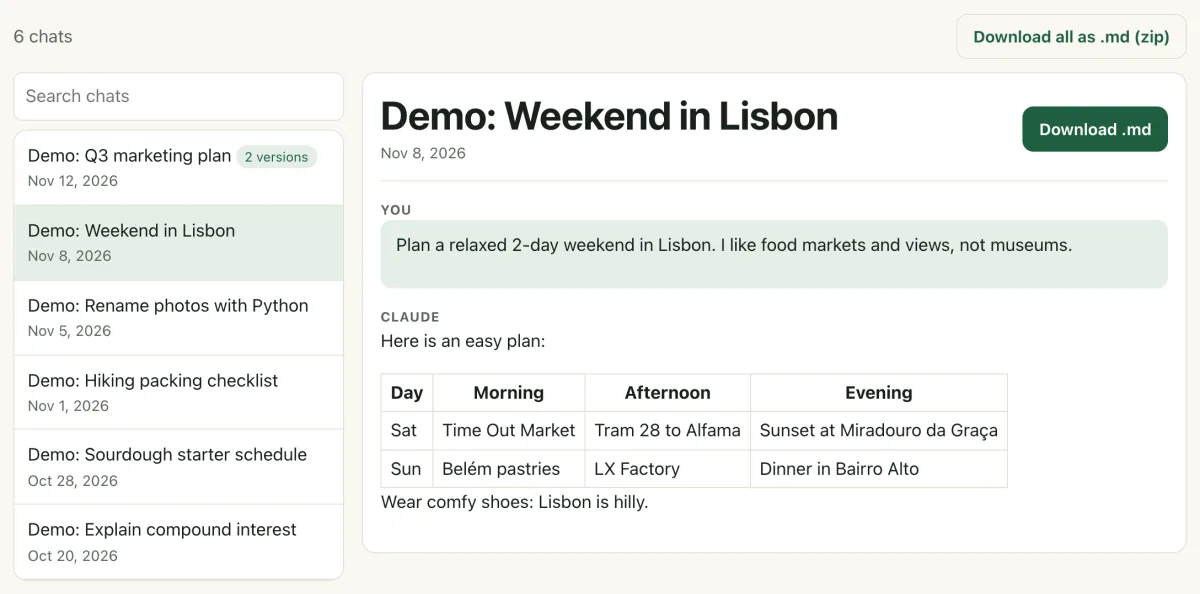
conversations.jsonworks too. - Read, search and save. Your chats appear in a list, newest first. Click one to read it with its formatting, tables and code. Type in the search box to find a word in any title or message. Click Download .md to save one chat, or Download all as .md (zip) to save them all.
Chats you edited
If you edited a message in a chat, the list shows a small "2 versions" tag (or more). Open the chat and use the Version menu to switch between the Original and each Edit. The export doesn't record which version you last had open on claude.ai, so the viewer shows the newest one first. More on this in how to find old versions after editing a message.
The faster way: skip the export with Backtrack
The data export works, but you wait for an email, the link expires in a day, and the zip is out of date the moment you start a new chat. Backtrack is a Chrome extension that reads your chats right inside claude.ai, so there's nothing to request:
- Save the chat you're looking at as .md, copy its text, or download the files Claude made. Free, with no limit.
- Back up every chat in one click: one zip with a .md file per chat, sorted into project folders, with every version. Your first full backup is free.
- Pro ($4.99 once, no subscription) lets you back up any time, turns on automatic daily backup, and adds PDF saves.
If you already have an export, Backtrack can read it too (from its settings) to make your first backup faster. Like the viewer, it runs in your browser and never uploads your chats.
Want your chats saved without waiting for an email? Add Backtrack to Chrome. Saving as .md is free.
Add to Chrome, freeFAQ
Is it safe to open my Claude export in the viewer?
Yes. The Claude Export Viewer reads the zip inside your browser. The file is never uploaded, and the site has no account, analytics or trackers. See the privacy policy.
How long does the Claude data export take?
Anthropic says it may take a short time to generate. You get an email with a download link. The link expires 24 hours after it is created and may only work once, so download the zip right away.
Can I export my Claude data from the phone app?
No. Anthropic says the export can't be started from Claude for iOS or Android. Use claude.ai in a browser or the Claude desktop app.
Does the export include the files I uploaded?
No. Anthropic's help center says the original files you uploaded are not included. Your chats and account data are.
Why does a chat say it has 2 versions?
You edited a message in that chat. Claude keeps the old message and its answer as a separate version, and the export includes both. Pick one from the Version menu in the viewer.
Related guides
Backtrack is an independent tool. It is not affiliated with, endorsed by, or sponsored by Anthropic. Claude is a trademark of Anthropic. Facts about claude.ai are from Anthropic's help center as of November 2026.